
Web conference technology has become a core part of modern business communication. As teams grow across cities, islands, and countries, staying connected without expensive travel is now a priority. Therefore, understanding what web conferencing is — and how it compares to traditional video conferencing — is essential for any organization today.
What Is a Web Conference?
A web conference is an online meeting solution that allows two or more participants in different locations to communicate in real time using internet-connected devices. Unlike traditional setups, a web conference runs entirely through a browser or lightweight application. No heavy hardware investment is required.
Web conferencing is widely used for business meetings, corporate training sessions, university distance learning, seminars, and inter-branch coordination.
Video Conference vs Web Conference: What’s the Difference?
At a glance, both tools seem similar. However, there are clear distinctions worth understanding before choosing a platform.
Video conferencing is desktop-based. It requires dedicated hardware such as cameras, microphones, monitors, and speakers, along with application installation on every device. Furthermore, it typically demands a broadband connection and comes with relatively high costs. User capacity is also limited by server size.
Web conferencing, on the other hand, is entirely web-based. It uses a software subscription model powered by TCP/IP internet technology. As a result, it runs on virtually any internet connection, supports a much larger number of users, and costs significantly less. In addition, it works on PCs, laptops, and smartphones — making it far more flexible for on-the-go teams.
Benefits of Web Conferencing for Business
Web conferencing delivers real, measurable advantages for organizations.
First, it makes time usage more efficient. Employees no longer need to spend hours commuting to attend a meeting. That time can instead go toward productive work. Second, it significantly reduces travel costs — especially for teams spread across multiple cities or countries.
Third, real-time audiovisual communication makes interactions feel more natural, almost like being in the same room. Fourth, document-sharing features allow participants to collaborate on files and share feedback during the meeting itself.
Key Features of a Web Conference Platform
A reliable web conference platform includes several features that make remote meetings more productive.
Presentation slides allow users to deliver live presentations that all participants can view in real time. Live video and audio streaming support full audiovisual communication throughout the session. Meeting recording lets hosts capture the entire session, either on the client’s device or on the server, for future reference.
In addition, an electronic whiteboard gives presenters and participants the ability to annotate slides or jot notes collaboratively during the meeting. Screen sharing extends this further — users can display Word, Excel, PDF, and PowerPoint files directly in the session. During the meeting, participants can review these documents and add comments. However, only the super user (administrator) has the authority to edit the content of shared documents.
Understanding User Roles in a Web Conference
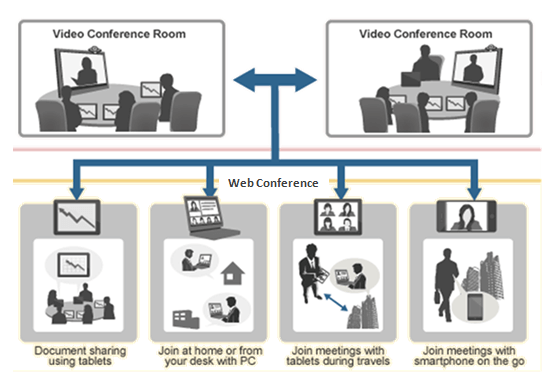
Fig. 1.1: Comparison of meeting schemes using video conference and web conference facilities.
In a web conference session, participants typically fall into one of two roles.
The conference leader (also called the super user or administrator) controls the meeting, manages shared content, and has full editing authority. A user is an active participant who can join discussions, use available features, and interact with others. A participant, meanwhile, is a passive attendee — they can listen and view the shared screen, but do not have the ability to interact or take control of the session.
Why Web Conferencing Is the Smarter Choice
In summary, web conference technology offers a more accessible, affordable, and scalable solution compared to traditional video conferencing. It removes the need for expensive hardware, supports large audiences, and works across all types of internet connections.
For businesses looking to improve team collaboration without increasing costs, a web conferencing solution is the clear path forward. IndonesianCloud provides reliable web-based communication infrastructure to help businesses stay connected. For more information, visit indonesiancloud.com
Written by: Reny Ajeng
Inside Sales – Business Solutions
That concludes our explanation. If you would like to read more articles about technology or need further information about Indonesiann Cloud’s products, please visit Indonesiancloud.com. See you in our next article.